 RSS Feed
Malware has managed to get off the planet and onto the International Space Station (ISS), NASA confirmed today. And it's not the first time that a worm or virus has stowed away on a trip into orbit.
The attack code, which space news site SpaceRef.com identified Monday as "W32.Gammima.AG," infected at least one of the laptops used on the station, an international effort headlined by the U.S. and Russia.
National Aeronautics and Space Administration spokesman Kelly Humphries declined to identify the malware, saying only that antivirus software detected a worm on July 25.
The first public report of malware about the ISS was logged on Aug. 11. In NASA's daily status report on the station, the agency said that Sergey Volkov, the ISS commander, was "working on the Russian RSS-2 laptop" and "ran digital photo flash cards from stowage through a virus check with the Norton AntiVirus application."A week later, on Aug. 21, Volkov "checked another Russian laptop, today RSK-1, for software virus by scanning its hard drives and a photo disk."
The next day, Volkov transmitted antivirus scanning results from the laptop to Earth, and U.S. astronaut Greg Chamitoff scanned another computer for possible infection. NASA also said in Friday's report that all laptops on board the ISS were being loaded with antivirus software.
"All A31p laptops onboard are currently being loaded with [the] latest [Norton AntiVirus] software and updated definition files for increased protection," said NASA.
source:Computer world
Malware in Space station notebooks
 Wednesday, August 27, 2008 |
MacBook air to get cheaper as solidstate technology reaches a new high
Tuesday, June 3, 2008 |
In future the MacBook Air will use lower-cost solid-state drives and the new generation of flash storage will reduce from a higher price today.Today, a consumer pays dearly for a solid-state drive (SSD). For example, for only 64GB of SSD storage on the MacBook Air, a consumer must pay a premium of about $1,000 over the 80GB hard disk drive model. But the cost per gigabyte of solid-state drive storage will drop as notebook PC makers like Apple switch to solid-state drives with capacities above 100GB based on multilevel cell (MLC) technology. Adoption by notebook PC makers is expected to start in the third quarter, according to industry sources.
All Solid State Device manufacturers have moved from the single-level cell (SLC), which is used in products like the MacBook Air, the ThinkPad X300 and HP 2510p to MLC technology.Intel is also set to move into the high-capacity SSD market on the back of its multilevel cell technology.
"Compared to the price you're paying today for a 64GB drive. You'll get a 128GB of storage for less than half the price (of the 64GB drive)," said Patrick Wilkison, vice president of marketing and business development at STEC, a supplier of MLC-based solid-state drives. The drives based on MLC technology offer better performance than hard disk drives. The current SSD manufacturers such as Samsung and Toshiba have also moved from single-level cell to multilevel cell.
MLC is a more sophisticated technology than current SLC. Its advantages are not only lower cost but higher capacity. Instead of the relatively small-capacity 64GB SLC-based drives being offered today in notebook PCs, manufacturers are targeting MLC-based drives ranging up to 256GB by the end of this year or early next year.
MLC NAND flash is a flash memory technology using multiple levels per cell to allow more bits to be stored as opposed to SLC NAND flash technologies, which uses a single level per cell. Currently, most MLC NAND stores four states per cell, so the four states yield two bits of information per cell. This reduces the amount of margin separating the states and results in the possibility of more errors. MLC NAND has the benefit of being cheaper due to the denser storage method used, but software complexity can be increased to compensate for a larger bit error ratio (BER).
The disadvantage is more complexity, which can result in lower performance. "Inherently, MLC is slower and inherently (has) less write cycling endurance," Intel has stated in the past.
Avi Cohen, managing partner of Avian Securities, sees it that way too. "You lose some speed and you lose some reliability when you move to MLC," he said. "Errors per cell with MLC is an order of magnitude worse than SLC, which isn't that great to begin with," Cohen said.
The higher BER requires an algorithm that can correct errors up to five bits and detect the condition of more than five bad bits. The most commonly used algorithm is Bose-Chaudhuri-Hocquenghem
A Single-Level Cell, SLC, memory card stores one bit in each cell, leading to faster transfer speeds, lower power consumption and higher cell endurance. The only disadvantage of Single-Level Cell is the manufacturing cost per MB. Based on that, the SLC flash technology is used in high-performance memory cards.
A Multi-level Cell, MLC, memory card stores three or more bits in each cell. By storing more bits per cell, a Multi-Level Cell memory card will achieve slower transfer speeds, higher power consumption and lower cell endurance than a Single-Level Cell memory card. The advantage of Multi-Level Cell memory card is the lower manufacturing costs. The MLC flash technology is used mostly in standard memory cards. The Multi-Bit Cell, MBC, is a similar technology to the Multi-Level Cell but stores only two bits per cell. Intel and STEC say they mitigate the reliability problem and boost performance with proprietary controller chips. "We spend 85 percent of our time grappling with this reliability issue" when talking to customers, said Wilkison. "NAND (flash memory) will forever have limitations. It will be subject to a finite number of program and erase (record and delete) cycles," he said.
"There's a lot of background operations happening to manage the media. Moving the data around to make sure you're evenly wearing down the drive. You're not necessarily pounding on one specific spot and then killing a (memory) cell prematurely," Wilkison said. "This is all controller intelligence."
The kind of technology to optimize the longevity of the drive is generally referred to as wear leveling. Error detection and error correction technologies are also used, Wilkison said.
Wilkison said he believes these techniques result in solid-state drives that are just as reliable as hard disk drives. And he expects a surge in adoption of solid-state drives in notebooks. Whereas today there is only one notebook model per company that comes with a solid-state drive, the number of models offered with such drives will increase exponentially in the second half of the year, he said.
There will still be a "price delta" between hard disk drives and solid-state drives but that will continue to come down with MLC technology, he said. Reports have cited Intel pricing as approaching $1 per gigabyte.
Solid-state drives have no moving parts. Hard disk drives, in contrast, use read-write heads that hover over spinning platters to access and record data. With no moving parts, solid-state drives avoid both the risk of mechanical failure and the mechanical delays of hard drives. Therefore, solid-state drives are generally faster and in some respects more reliable.
 0
comments
0
comments
 Labels:
flash drive,
flash memory,
Industry news,
Laptops,
MacBook Air,
News,
Notebooks,
ssd,
Subnotebooks,
Technology
Labels:
flash drive,
flash memory,
Industry news,
Laptops,
MacBook Air,
News,
Notebooks,
ssd,
Subnotebooks,
Technology
Senior editor looses his MacBook air
Thursday, March 13, 2008 |

I read a blog post by steven levy, one of the senior editors of The washington post and he had lost his MacBook Air. The thin slidy laptop which is smaller than small was lost in thin air of his apartment. The fact that the delicate small chap(teh Air) of apple is small,it can easily slide into small crevices. The Air is a fabulous thing and the fact the Air became so thin was that it was kept on an abstemious diet.With a few parts chopped off, the apple guys managed to create a notebook that deserved a worldwide attention. The MacBook Air got an ideal start but it had to be sold. Buying the notebook meant that you were buying a notebook that could fit in your pocket(not in terms of money,but size). Currently the PDA and the mobile phones are the gadgets that fit easily in our pockets and they get slided away with the same ease by thieves too.This could have happened with steven possibly. He also suspected that it could have gone away with the thick trash of old newspapers and magazines into the recycling bin.This incident shouldn't really affect the sales of the MacBook Air which has been specifically built for those who travel frequently but it surely highlights the fact that human nature and habits could play a vital role in the success of the Mac commercially. You wouldn't like to buy a notebook which get lost or stolen easily.
Read the blog of steven levy
Also try : MacBook Air - Pros n Cons
0
comments
Labels:
Apple,
Laptops,
MacBook Air,
Notebooks
The 10 characteristics of MacBook Air
Saturday, January 19, 2008 |
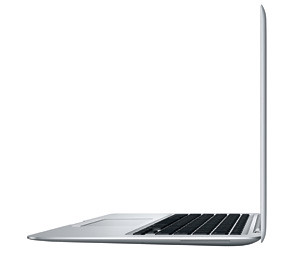
To begin with what exactly is the MacBook Air?
It’s Apple’s entry into the lightweight portable computer market known as the subnotebook
The 10 characteristics
- Cost
- The base 1.6GHz model costs $1,799, $300 more than the top-of-the-line 2.2 GHz black MacBook, and $200 less than the low-end 2.2GHz 15-inch MacBook Pro
- Weight
- 3 pounds
- MacBook weighs 5 pounds, the 15-inch MacBook Pro, 5.4 pounds, and the 17-inch MacBook Pro, 6.8 pounds.
- Size
- The wedge-shaped laptop actually tapers from 0.76 inches high at the back to 0.16 inches at the front. In terms of its width and depth, it’s actually almost identical to the MacBook, at 12.8 inches wide and 8.9 inches deep.
- Trackpad
- The trackpad is capable of recognizing multi-touch gestures, similar to using an iPhone or iPod touch.
- Ethernet
- MacBook Air doesn’t have it. If you need Ethernet connectivity, Apple will sell a $29 10/100BASE-T USB Ethernet adapter that connects to the USB port.
- Keyboard
- It’s a full-sized MacBook-style keyboard, complete with square keycaps, in black. The keyboard is backlit, similar to those on the MacBook Pros
- Display
- The MacBook Air also has a 13.3-inch widescreen display with 1,280-by-800-pixels resolution. It also includes a built-in iSight camera
- Micro DVI ports
- Though the MacBook Air uses the smaller micro-DVI port rather than the MacBook’s built-in mini-DVI, the computer otherwise has the same video capabilities as the MacBook: it will drive external displays as large as 1,920-by-1,200 pixels, including Apple’s 23-inch Cinema Display, and can use that display as either an additional display or as a mirror of the laptop screen’s contents. The MacBook Air also uses the same Intel GMA X3100 integrated graphics processor with 144MB of shared memory as the MacBook.
- Optical drive
- Apple’s guess is that you’ll have another computer in your house or office with a built-in optical drive. That’s why it’s included the new Remote Disc software with MacBook Air.After you’ve installed Remote Disc on any Mac or PC with a CD or DVD drive, the MacBook Air can connect to that computer and read the disc in the drive as if it were its own. When you click on the new Remote Disc item in the Finder’s sidebar on the MacBook Air, you’ll see a list of all the computers on your local Bonjour network that have Remote Disc installed. Click on a computer and one of two things will happen—either you’ll just take control of the drive, or (optionally) the user of the other computer will be prompted to allow you to take control.
If your MacBook Air has a catastrophic problem and you need to reinstall Mac OS X, you can even do that via a Remote Disc. As for watching movies, Apple suggests you use an iPod, iPhone, or iTunes to watch movies instead of playing a DVD. - Internet connectivity
- The MacBook Air includes 802.11n wireless networking, as well as Bluetooth 2.1 + EDR for mice and the like.
0
comments
Labels:
Apple,
Laptops,
MacBook Air,
microsoft,
Notebooks,
Subnotebooks